This is the most often used method of connecting to the Hyperproof API.
For machine-to-machine (M2M) applications—such as CLIs, daemons, or backend services—the app itself authenticates and is authorized to access Hyperproof APIs, rather than an individual user. Because no user is involved, traditional authentication methods (like username/password or social logins) are not applicable.
In this scenario, use the OAuth 2.0 client credentials flow, as defined in RFC 6749, Section 4.4. Your app sends its client ID and client secret to Hyperproof’s authorization server to obtain an access token.
Once issued, include this access token in the authorization header of your API requests to authenticate subsequent calls.
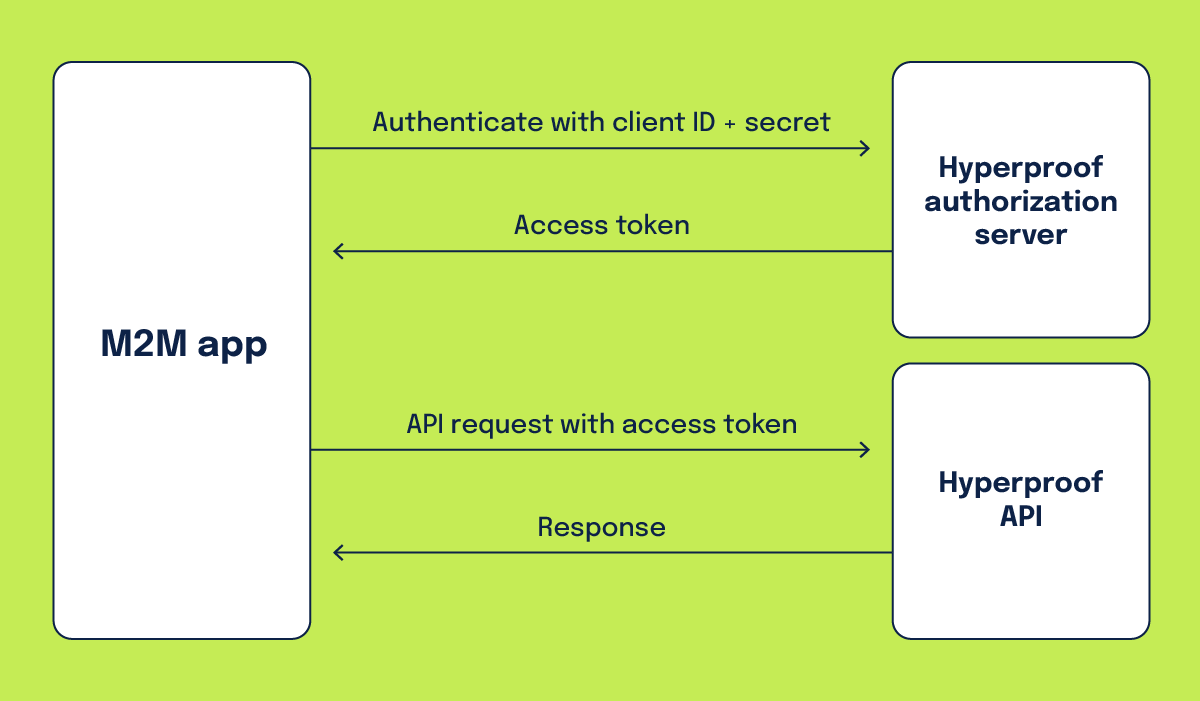
To get started with the client credentials flow, you must first create an API client in your Hyperproof organization. Before you can create an API client, the feature must be enabled in your organization. Your Hyperproof Customer Success Manager (CSM) can enable this for you.
Once the API client feature is enabled, you'll need to decide which type of API client you want to create:
- Personal API client — An API client that inherits your roles and permissions in the organization. When using this type of API client, any items that are created or updated reflect that they were created or updated by you. Personal API clients are private to you; no one else in the organization has the ability to see your personal API client.
- Service account API client — An API client that operates as a service account. Service accounts are security identities with an assigned role in the organization that can be used to access the resources in that organization. Service accounts can be thought of as a "user identity" as they appear as users in the organization. However, service accounts cannot be owners or assignees on Hyperproof objects.
- When using the service ccount API client type to create or update objects in Hyperproof, the service account is recorded as the user who performed the operation. Additionally, service account API clients are visible to all administrators in the organization.
To create a personal API client or a service account API client, refer to Enabling M2M API authentication.
When creating an API client, be sure to select the scopes to which you wish this client to have access. 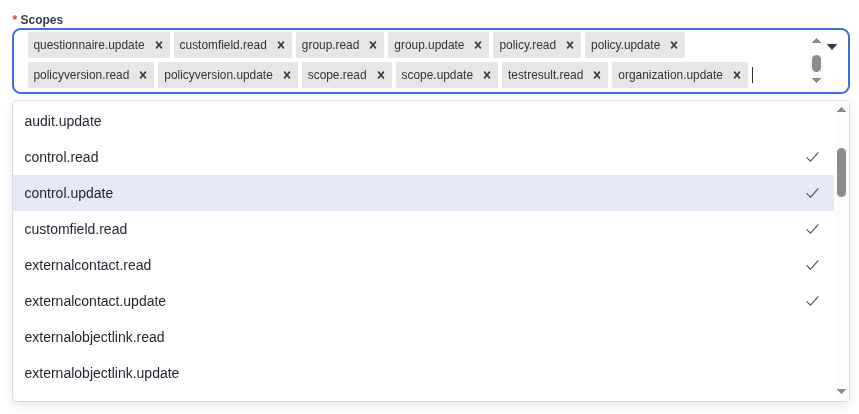
Hyperproof uses the following OAuth 2.0 endpoint to allow your app to retrieve an access token using the client credentials flow:
- Request token -
https://accounts.hyperproof.app/oauth/token
To retrieve an access token, you must include the grant type, client ID, and client secret as form URL encoded values.
curl -s -d "grant_type=client_credentials&client_id=YOUR_CLIENT_ID&client_secret=YOUR_CLIENT_SECRET" https://accounts.hyperproof.app/oauth/tokenIf successful, the response body will be a JSON representation of the access token:
{
  "access_token": "eyJhbGciOiJIUzI1NiIsInR5cCI6IkpXVCJ9.eyJ2ZXIiOiIxLjAiLCJpc3...",
  "token_type": "bearer",
  "expires_in": 3600
}Make requests to the Hyperproof APIs by sending the access_token value as the Authorization Bearer header.
Authorization: Bearer <access_token>GET https://api.hyperproof.app/v1/controls/{controlId}This API request retrieves the control identified by controlId from the organization.
Request headers
{
  "Authorization": "Bearer eyJhbGciOiJIUzI1NiIsInR5cCI6IkpXVCJ9.eyJ2ZXIiOiIxLjAiLCJpc3..."
}
If successful, the response body will be a JSON representation of the control:
{
  "id": "string",
  "orgId": "string",
  "controlIdentifier": "string",
  "name": "string",
  "description": "string",
  "notes": "string",
  "domainId": "string",
  "domainName": "string",
  "workStatus": "string",
  "owner": {
    "id": "string",
    "email": "string",
    "givenName": "string",
    "surname": "string",
    "profilePhotoName": "string",
    "userId": "string",
    "roleIds": [
      "string"
    ],
    "state": "string"
  },
  "freshnessPolicy": "string",
  "freshForDuration": "string",
  "createdBy": {
    "id": "string",
    "email": "string",
    "givenName": "string",
    "surname": "string",
    "profilePhotoName": "string",
    "userId": "string",
    "roleIds": [
      "string"
    ],
    "state": "string"
  },
  "createdOn": "string",
  "updatedBy": {
    "id": "string",
    "email": "string",
    "givenName": "string",
    "surname": "string",
    "profilePhotoName": "string",
    "userId": "string",
    "roleIds": [
      "string"
    ],
    "state": "string"
  },
  "updatedOn": "string",
  "status": "string",
  "permissions": [
    "string"
  ]
}