A Hypersync app is a Node.js module that connects to an external service, retrieves data, and formats it so it can be imported into Hyperproof as proof. Each Hypersync app follows a defined structure designed to integrate seamlessly within the Hyperproof ecosystem.
The sections below explain how Hypersync apps are built, how they operate, and how you can develop one your own.
Because Hypersync apps are built as Node.js modules, you can create them entirely through code. If you’re comfortable with TypeScript or JavaScript and familiar with web technologies like HTTP and REST APIs, building a custom Hypersync app should feel natural. The SDK provides a modern, well-structured framework that follows established Node.js best practices.
For those less comfortable with coding, the Hypersync SDK also supports a declarative approach. Many parts of a Hypersync app can be configured using structured JSON files, allowing you to define behavior without writing any code. Using these JSON configurations, you can:
- Access new REST APIs
- Provide additional filtering or selection criteria to users
- Expose new proof types within your Hypersync
In the current SDK version, some functionality still requires minimal code. If you’re starting from a template or building an app from scratch, you’ll likely write a few lines of code. However, if you begin with one of our end-to-end sample apps, we’ve designed them to be easily extended using JSON—with no coding required.
Whether you’re writing code, working declaratively, or combining both approaches, the sections below will help you understand how Hypersync apps are structured and how they operate.
Every Hypersync app contains these key components:
- Data source - Connects to an external service and extracts data from that service.
- One or more proof types - Can be selected by the user to bring a specific type of data into Hyperproof from the external service.
- An optional criteria provider - Specifies the criteria that must be provided by the user to properly locate and filter the data in the generated proof.
The Hypersync app unifies these components and exposes an interface for integration with the Hypersync ecosystem.
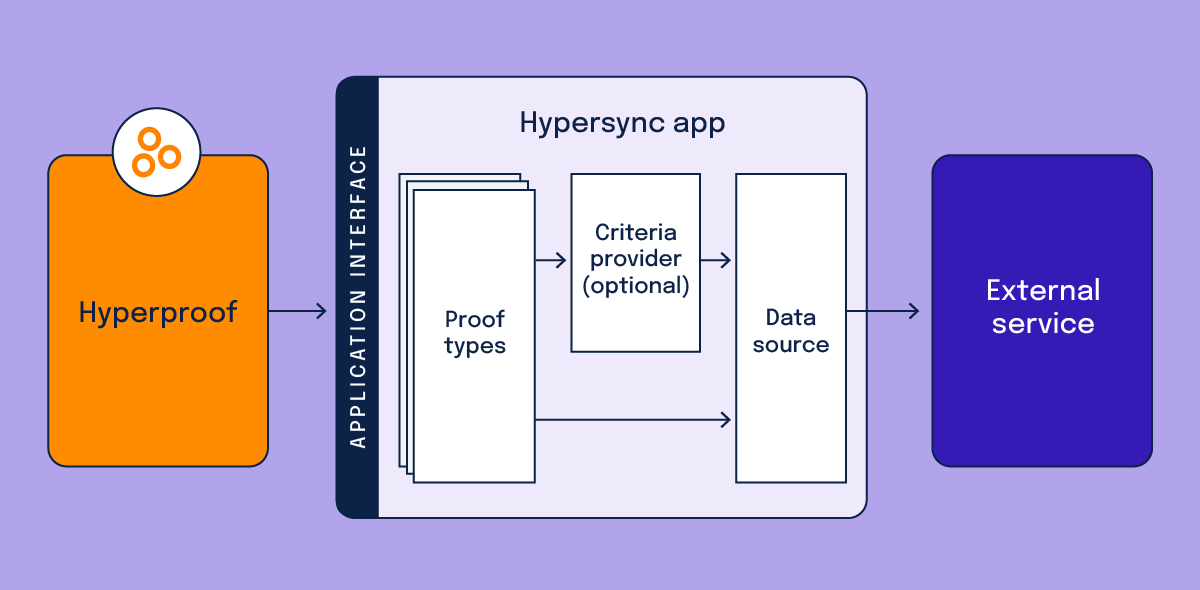
When a Hyperproof user creates a new Hypersync, they first select an app and then establish a connection to the external service. Depending on the service, this may involve entering credentials, providing an API key, or completing an OAuth 2.0 authorization. Once created, the connection is securely stored in Hyperproof.
After the connection is established, the user selects a proof type, which defines the kind of data to import. Each proof type includes criteria fields for filtering the data—these are managed by the criteria provider component. Most criteria can be declared in JSON, though custom providers can also be implemented in code.
When the user saves the Hypersync, it runs its first sync. The app retrieves data from the external service using the defined criteria and formats it according to the proof type. This formatting can be implemented in code or configured declaratively through JSON.